If your team is three people or fewer, you can run time tracking on Jasper HQ without paying. This page says what the Free plan covers, what it leaves out and what changes when you grow, so you can decide before you sign up. The limits come from the pricing page, which is the source if the two ever differ.
What Free includes
Up to 3 people, with Chat and Time and 90 days of history. No card needed. Time is the app that holds the timer, manual entries, weekly timesheets with approvals, reports, and the Client Hub with its retainers. Chat is the team messaging app, so the people tracking time can also talk about the work. The desktop app runs on macOS, Windows and Linux, and the phone app is on Android on Google Play, with no iPhone app on the App Store yet. The desktop and Android apps keep the timer and new entries while you are offline and send them when you reconnect, and a timer saved late is held for review.
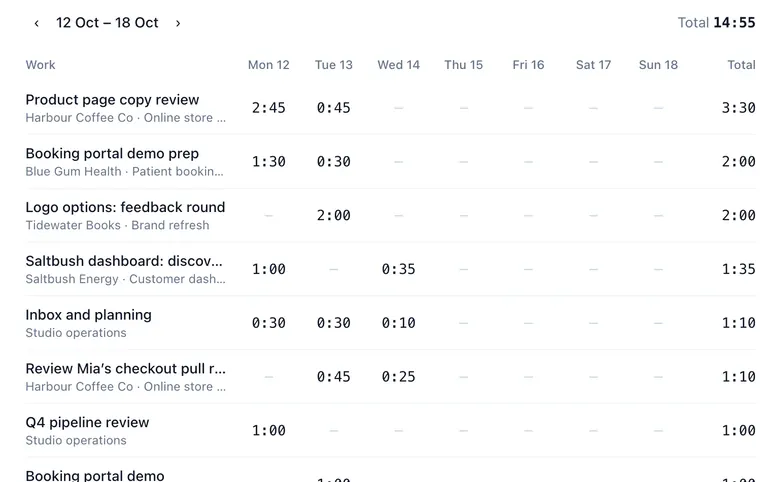
What you can do with the Time app
- Start a timer in the browser or the desktop app, or add time by hand. Each web entry takes a client and a description.
- Submit a weekly timesheet and have an approver approve it, reject it with a reason or ask for changes. Approving locks the week.
- Mark time billable or non-billable. Only owners and admins can change the flag.
- Report on hours by client, project or person, and export to CSV or PDF.
- Follow client retainers in the Client Hub as the team logs hours against them.
In a team of three, nobody can approve their own timesheet, so someone else needs the approval permission. If that does not suit you, an admin can turn approval off in the timesheet settings, and a submitted week is then approved at once.
What Free does not include
Jasper HQ is sold as apps, and Free contains two of them: Chat and Time. These are not in Free:
- Leave. Leave requests, balances, accrual policies and public holidays are in the People app, which is a paid app. Without it there is no leave on the timeline and no leave turning into time entries.
- Mail, Work, Meetings and Dev. Shared mail, tasks and documents, meeting notes and recording, and code review and uptime monitoring each belong to another app.
- More than 3 people. A fourth person means choosing a paid plan.
- More than 90 days of history. Older items are hidden, not deleted, and come back when you upgrade.
Every new workspace also starts with a 14-day trial with everything on. Before it ends you pick a paid plan or drop to Free. Nothing is charged without your say-so.
What it does not do
- No invoicing and no expenses. Exports hold hours and a billable flag, not amounts.
- Time entries can be imported from a Clockify Detailed report CSV (the import guide), but not from other trackers. Keep their exports for past hours.
- No kiosk, and no screenshots or activity monitoring.
Is it right for you?
Free fits a small agency or studio that wants one place for hours and chat, or a freelancer pair who need approvals and a clean client report. It is a poor fit if you need leave, shared mail or more than three people from day one. Then the paid apps are the honest answer, and the pricing page shows them. If you are weighing other free trackers, the comparison pages list where each one is better. To see the timer and reports first, read the time tracking page, and for the approval step in detail read timesheets with approvals.
Want to set up a week before you start? The weekly timesheet template and the timesheet calculator work with or without Jasper.