An Otter.ai alternative for agency meeting notes
Otter.ai is a dedicated note-taker: an AI agent can join your Zoom, Teams and Google Meet meetings, or you can record bot-free from its Mac and Windows apps or Chrome, and it has iOS and Android apps. Stay with Otter if your team records online calls on phones, or sends notes to Salesforce or HubSpot. Pick Jasper if you want the notes in the workspace where your team already chats, tracks time and plans work, and a recorder that joins nothing.
Otter.ai at a glance
- Otter plans
- Basic (free), Pro, Business and Enterprise
- Facts checked
- 2 Nov 2026
Where each product is better
Where Otter.ai is better
- Mobile apps for iOS and Android that record online calls. Jasper HQ on a phone records only meetings held in person.
- An AI agent that joins your meetings and sits in the calendar for you, as well as a bot-free option.
- Salesforce and HubSpot syncing, Zapier, and an API and webhooks. Jasper sends action items to ClickUp tasks and time entries, and has no connections to Salesforce or HubSpot.
- SSO and SCIM on its Enterprise plan, and longer recordings (up to 4 hours) on Business.
Where Jasper is better
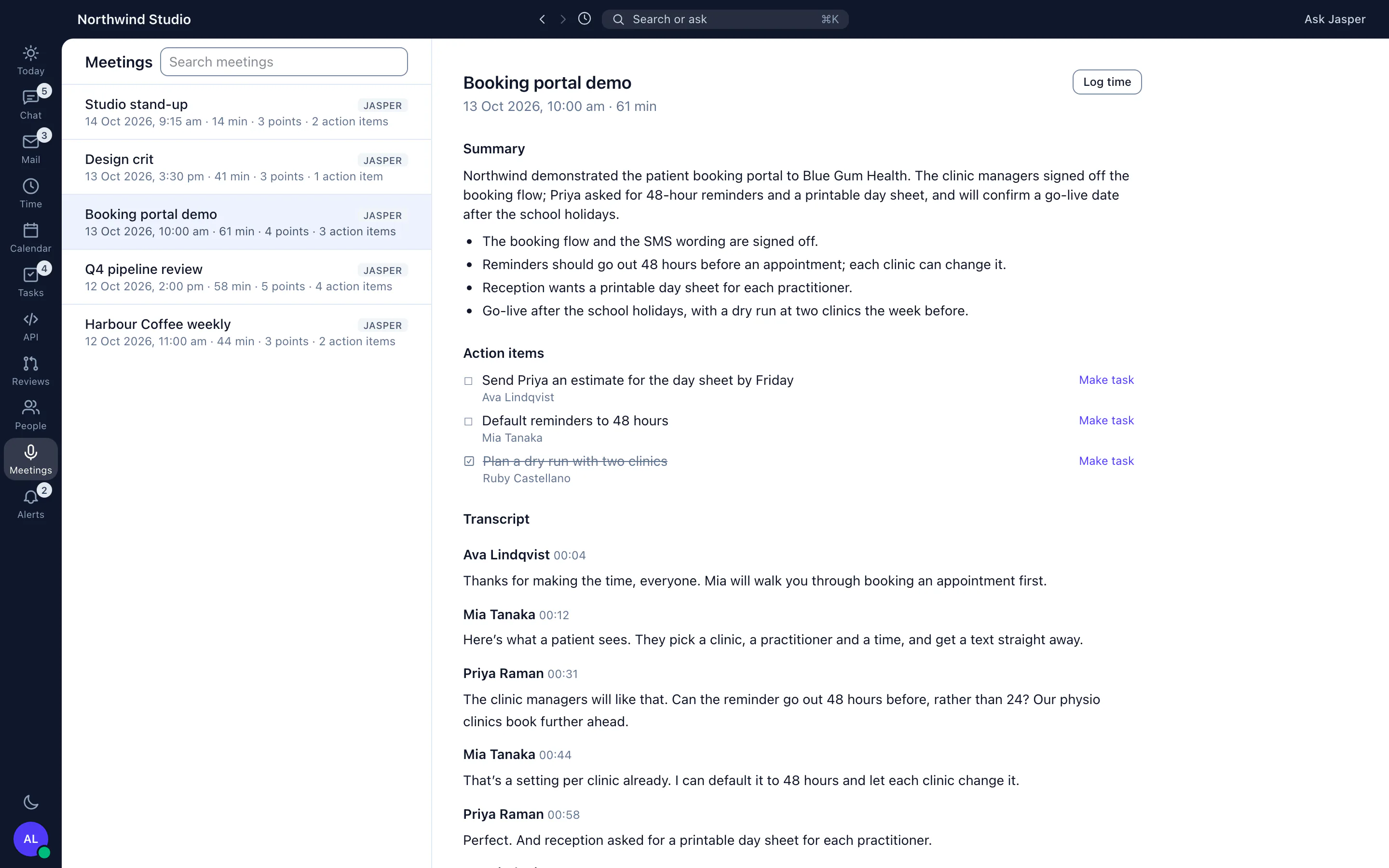
- The notes land in the workspace where the team already chats, calls, mails and tracks time, next to Jasper's own recorded calls and huddles.
- Each action item can become a ClickUp task in a click, and the meeting's time can be logged with its title and length filled in.
- Speaker names: in a Jasper call each line is attributed to the person who said it, and where a transcript shows numbered speakers, anyone who was there can name them.
- The recorder is bot-free, so nothing joins the call. Telling the people you record, and getting their consent where the law needs it, is still the recorder's job; see "Do I need everyone's consent to record?" below.
Jasper vs Otter.ai: the facts
Each Otter.ai fact links to the page we read it on. Each Jasper fact links to the Jasper page that describes it.
Otter.ai pricing
Otter sells per-user plans after a free Basic plan, and its pricing page shows monthly, annual and promotional prices that change. Check the page for today's figures. We do not copy prices here, so they cannot go stale: see Otter.ai's own pricing page.
Jasper: free to start, with chat and time tracking for up to 3 people. Mail is in the Mail app, the wiki in Work, leave and the intranet in People, and uptime monitoring in Dev. See pricing or talk to us.
Switching from Otter to the Jasper recorder
- An owner or admin turns on Meeting recorder in Settings, then Features.
- Everyone installs the Jasper desktop app, version 2.22.0 or later. On a Mac, allow Jasper to record system audio when macOS asks.
- Each person opens the menu-bar icon and chooses Ask me, so Jasper offers to record when Zoom, Teams, Webex, Slack or a browser starts using the microphone, or presses Record this meeting on a calendar event.
- Keep Otter for a few weeks until each person has meetings recorded in Jasper. Jasper cannot import earlier Otter meetings.
- Then cancel your Otter plan with Otter.
See Jasper for yourself
Start free and invite your team, or contact us with a question.
Questions people ask
Is Jasper a replacement for Otter.ai?
For teams that record online meetings on a computer, yes. If your people record on phones, or send notes to Salesforce or HubSpot, keep Otter.
Does Jasper tell the other people in a meeting that it is recording?
No. Jasper records on your computer and shows a red bar to you while it runs. It joins nothing, so it shows the other people nothing. If the calendar event lists a guest from outside your organisation, Jasper asks you to confirm you have told them before it records. Anyone who is not on the calendar event does not trigger that question.
Can Jasper record Zoom, Google Meet and Teams calls?
Yes, from the desktop app, once an owner or admin has switched on Meeting recorder. It records your microphone and the other people's sound from your computer. It does not join the meeting.
Can I import my Otter transcripts?
No. Jasper does not import transcripts from Otter, so earlier meetings stay in Otter.
Do I need everyone's consent to record a meeting?
That depends on where you and the other people are. Some countries and states need only one person to know, and others need everyone to agree. Jasper treats the person recording as having agreed and does not ask the others, so telling them is up to you. Ask your own adviser if you are unsure.
Sources and review log
- https://otter.ai, checked 2 Nov 2026
- https://otter.ai/pricing, checked 2 Nov 2026
We read every Otter.ai fact on Otter.ai's own website, and remove any we can't confirm. Next review due 2 Mar 2027. Tell us if something here is out of date.
Related comparisons
More from Jasper
Otter.ai is a trademark of its owner, used here only to identify the product we compare against. Jasper HQ is a team workspace built by Shakewell. Jasper HQ is not affiliated with Jasper AI.