The problem it solves
Retainer hours usually live in a spreadsheet that someone updates at month end, and the first person to notice a client is over their allowance is the client. Jasper counts the hours as your team logs them, so an account lead can see a retainer burning before the invoice goes out.
An agency sells hours, so the question every account lead gets asked is how many are left. Answering it from a spreadsheet means someone has to copy the timesheets across, and the number is stale the moment it is typed. The Client Hub answers it from the same time entries your team already logs.
What it does
One profile for each client
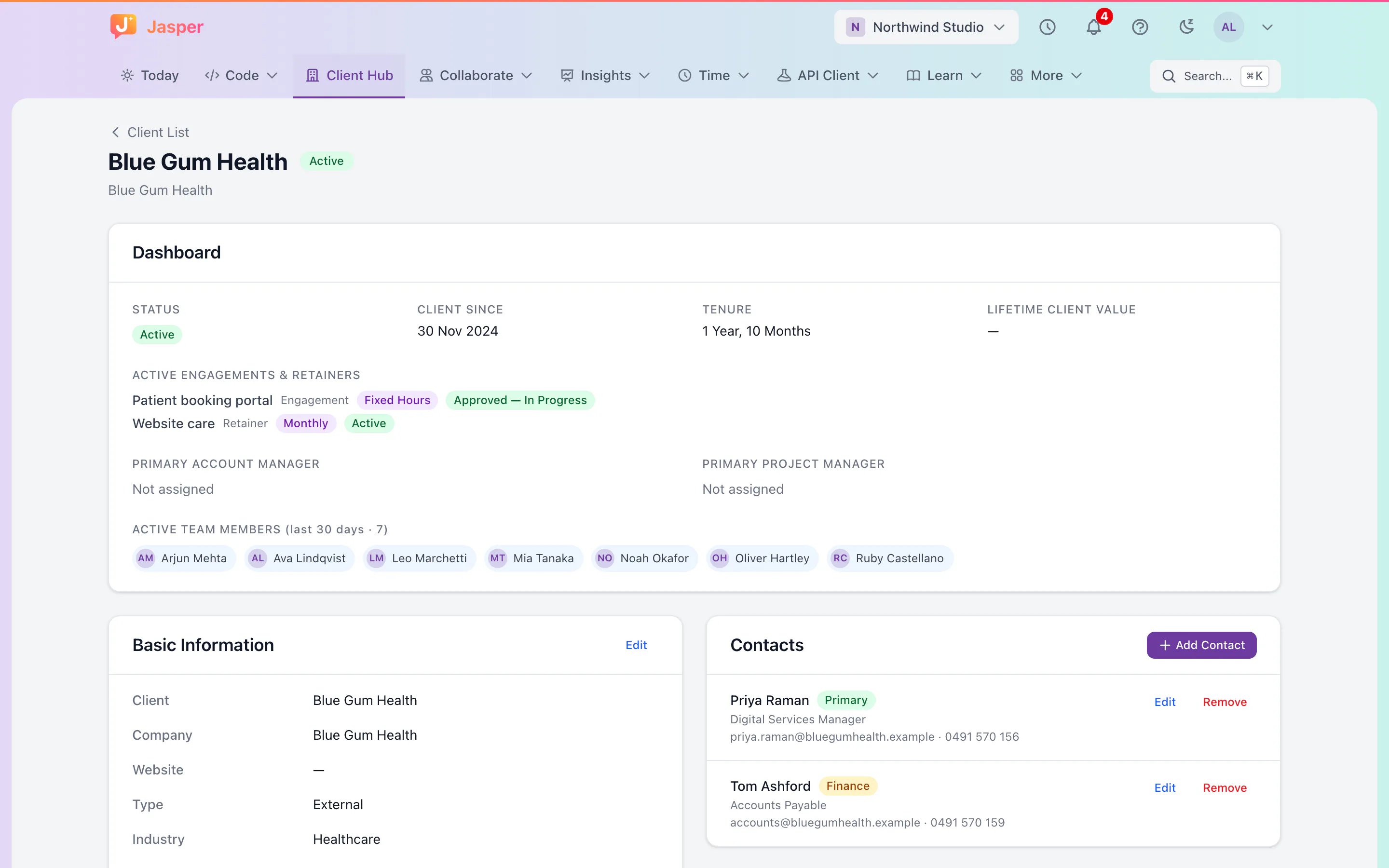
Open a client and see, in order: a dashboard, basic information, contacts, the master service agreement, commercial engagements, retainers and hosting agreements. Clients you already have in time tracking appear without any setup, because the Client Hub and time tracking share one record for each client. The list filters by status (Active, Prospective or Archived), industry and type, and shows how many people logged time for the client in the last 30 days.
Retainers that count themselves
Link a retainer to the projects it covers. Hours logged on those projects count against it, billable or not, from the start date to today, the end date or the close-out date. Paid leave and time that is pending or rejected do not count.
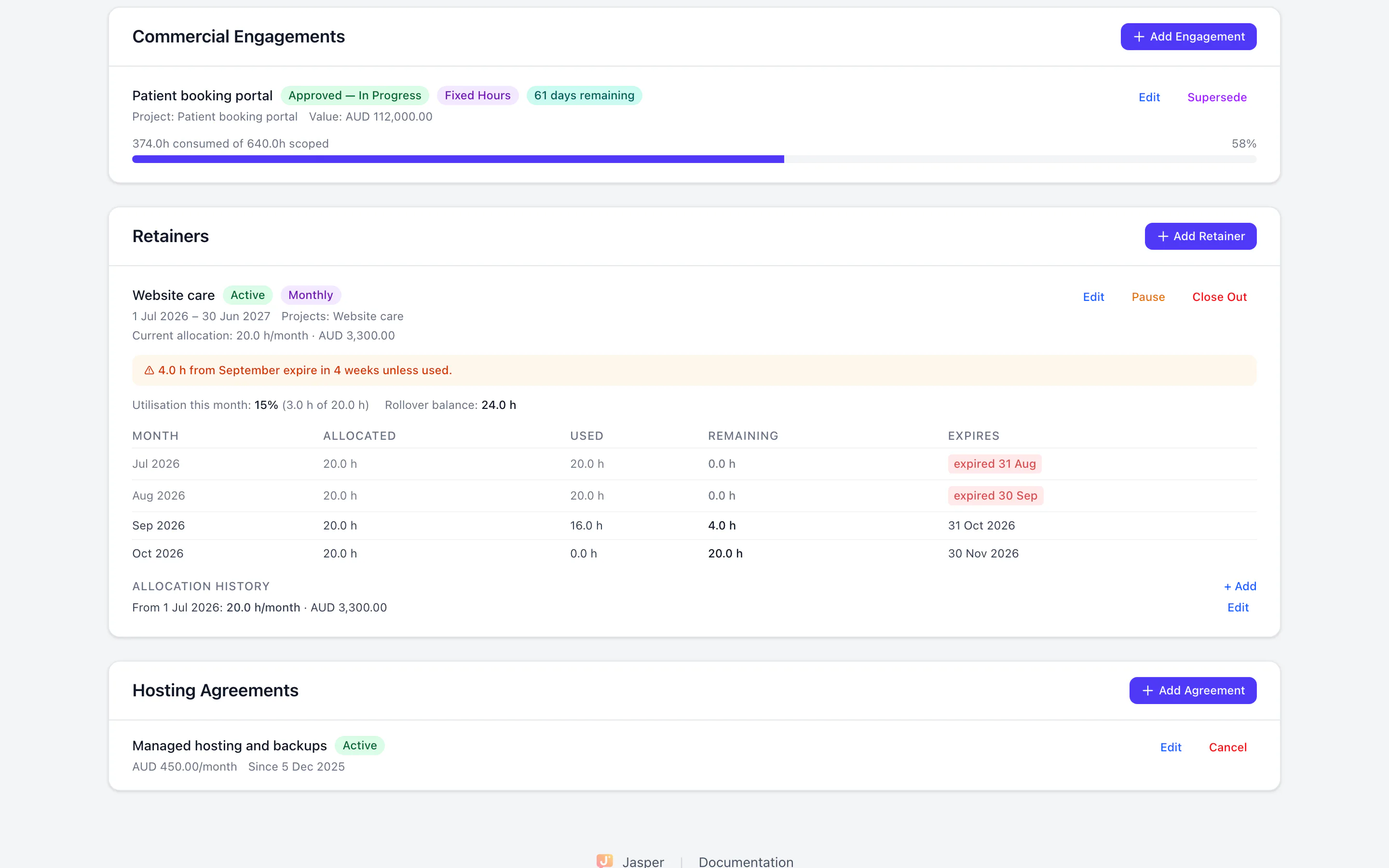
- Monthly: a ledger with a row for each month showing hours allocated, used and left, and when the unused hours expire. Hours are used oldest first.
- Annual: a progress bar for the period and the pace needed each month to use the rest.
- Managed services: a monthly fee with no hours cap, with the hours logged this month, the monthly average and the total since the start shown on the card.
Rollover, pause and close-out
Choose how long unused hours last, from 1 to 24 months. Within 30 days of expiry, the card says how many hours are about to go. Expiry only flags hours; an admin chooses whether to forfeit them. Pause a retainer when work stops, and its expiry dates move later by the length of the pause. Close it out when it ends, with the unused hours written off.
Engagements and agreements
For fixed-scope work, an engagement tracks hours consumed against hours scoped (Fixed Hours), a list of deliverables with estimates (Deliverable-Based), or hours logged and spend against a not-to-exceed budget (Time and Materials). The master service agreement is recorded with its status, dates and a link to the signed copy. Hosting agreements record a flat monthly fee.
Fill the form from the contract
Upload a PDF or Word agreement and Jasper reads it to pre-fill the engagement, retainer, hosting or agreement form. You check every value, and nothing is saved until you click Add.
Money stays with the people who should see it
Lifetime value, commercial value, retainer values and hosting fees are hidden unless a person has been given the permission to see revenue and margin figures. It is granted to named people, not to a role.
How agencies use it
The monthly retainer check
On the last week of the month, an account lead opens the client's retainer card, sees that 12 hours from two months ago expire soon, and plans the work or tells the client early. Owners and admins also see retainers more than 80% used in Today.
Moving a client from a project to a retainer
When a pricing model changes, supersede the engagement: the old one ends with a final status, and a new one starts with the new model and takes over the linked project, counting hours from that day.
What it doesn't do yet
- It is for your staff. There is no client portal. Clients and guests you invite can join the chat conversations you add them to; a read-only retainer card for a client can be switched on, but it shows on the client's Tasks home, which is not open to other companies yet.
- It counts hours, not money. No invoices are sent, and contracts are links, with no e-signature.
- No burndown chart. Monthly retainers have the ledger, and annual ones have the progress bar and pace.
- Expiry warnings show on the card only. Jasper does not email them.
- A monthly retainer that starts part-way through a month gets no hours for that first month, so start monthly retainers on the 1st.
- Retainers, engagements and agreements cannot be deleted. Change their status instead.
- Money values are in AUD, USD, NZD, GBP or EUR, with no conversion between them.
- The Client Hub itself is in the web app only, not the desktop or phone app. Filing mail by client domain is in the desktop app.
How it connects
Web: The whole Client Hub: the client list, profiles, agreements, engagements and retainers. Only owners and admins can add or change them.
Desktop app (macOS, Windows and Linux): Not in the desktop app.
- Time tracking: the hours your team logs on a retainer's linked projects count against it, and paid leave does not.
- Desktop mail: in the desktop app, mail from a client's email domains files under that client.
- Today: owners and admins see retainers that are more than 80% used.
Plans
The Client Hub is part of time tracking, which is in the Time app. See the price.