Moving from ClickUp to Jasper
Jasper does not replace ClickUp for other companies yet. Its own task lists are being trialled by our team, and the importer that moved our spaces across is run by us, not a button you press. What you can do today is connect ClickUp, keep your tasks there, and move chat, calls, mail, timesheets and meeting notes into Jasper around it.
Where this stands
Our own team has moved its ClickUp spaces into Jasper with a staff-run importer. Jasper's task lists are not open to other companies yet. If you want to know when they are, tell us. Questions before you start? Contact us.
What moves and what stays
What connects or moves today
- Tasks, comments and changes in the ClickUp workspaces you allow are read into Jasper as they happen, by webhook, with an hourly and a daily full sync. Your tasks stay in ClickUp.
- Each person adds their own ClickUp token and sees their tasks and task inbox in the desktop app, and can comment, change a task and create tasks as themselves. Tasks also works on the web.
- A pull request with the ClickUp task ID in its title is linked to the task, and the task gets Jasper's review summary as a comment.
- A time entry can link to a ClickUp task, and a meeting's action item can become a ClickUp task (needs the Time app for ClickUp).
What stays in ClickUp
- Your tasks. Jasper reads and changes them in ClickUp; it does not hold a second copy you work from.
- Spaces, lists and statuses are set up in ClickUp, some custom field types can only be edited there, and attachments cannot be deleted from Jasper.
- Time tracked in ClickUp is not added to Jasper timesheets, and Jasper does not send hours to ClickUp.
- Jasper does not change a task's status when a pull request opens or merges.
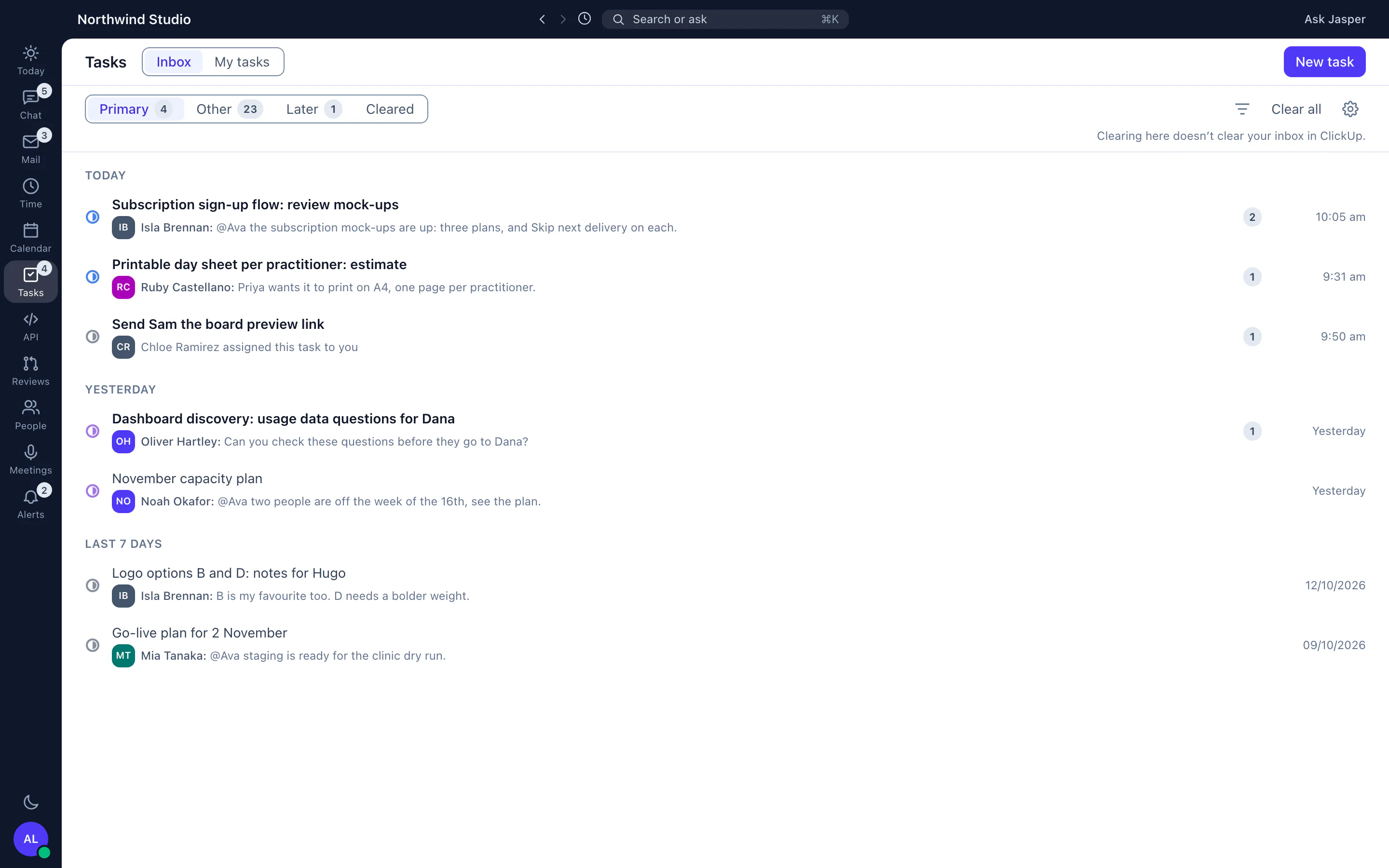
What our own importer does
- It reads ClickUp spaces, lists, tasks, comments, files and history into Jasper Tasks, and every ClickUp Doc into the wiki. A run can be repeated, and carries on from the last list it finished after a failure.
- Imported lists stay archived until a wave cuts their space over. A wave takes one space, or every space of one client, as a dry run first, then for real after a final sweep of what changed since.
- It writes reports of the people it could not match by email and of what is shared with each client.
- Making a space view-only in ClickUp is left to the person running the move.
A realistic order, running both side by side
-
Week 1
An owner or admin connects ClickUp in Settings and ticks the workspaces Jasper may use. ClickUp is in the Time app, which Free includes for up to 3 people.
-
Week 1
Each person adds a ClickUp personal API token under Personal settings, then Integrations, to see their tasks in the desktop app.
-
Week 1 to 2
Install the Jasper GitHub App, map each repository to ClickUp, and put the task ID in pull request titles.
-
Week 2
Move team conversation into Jasper channels. Paste a ClickUp task link and people who can open the task see its details.
-
Week 2 to 4
Start the timer from tasks, run one timesheet period, and check it against the hours people see in ClickUp.
-
When it opens
Task lists in Jasper, if you want them, would arrive as a space-by-space move. That is not open to other companies yet.
Start your move
Start free and invite your team, or contact us with a question first.
Questions people ask
Can I import my ClickUp tasks into Jasper?
Not yourself. Our own team imported its spaces with a command that we run, and Jasper's task lists are not open to other companies yet. Tasks works with ClickUp today: your tasks stay in ClickUp.
Will I lose anything if I connect ClickUp?
Connecting does not move or delete tasks. Disconnecting deletes Jasper's sign-in tokens and repository mappings; copied tasks and task links stay in Jasper, and the webhooks Jasper created stay in ClickUp until you delete them there.
Does Jasper replace ClickUp?
Not for other companies today. Our team has moved off it. Everyone else can use Jasper next to it.
Do ClickUp Docs move?
The importer brings every ClickUp Doc into the Jasper wiki, but it is run by our team. If you connect ClickUp yourself, Docs stay in ClickUp.
More from Jasper
ClickUp is a trademark of its owner, used here only to identify the product you are moving from. Jasper HQ is a team workspace built by Shakewell. Jasper HQ is not affiliated with Jasper AI.